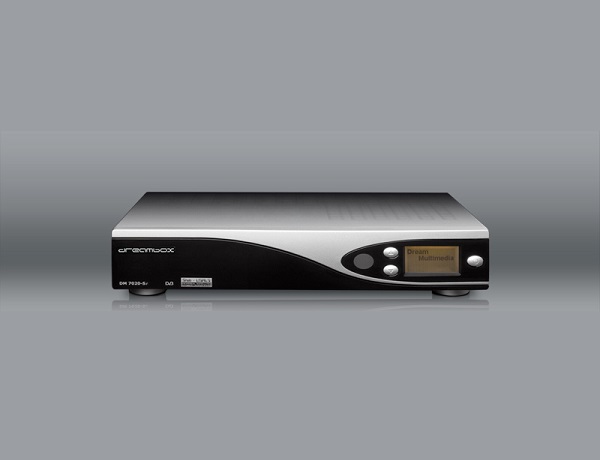
DM7020
Said IPTV Engineering
Said IPTV Technical Architecture Desk

What is DM7020?
Powerful receiver for digital TV and Radio programs.
Main features are a 250 MHz PowerPC (350 Mips), Linux OS and the Dreambox DM7020 supports standard Linux API
- 10/100MBit compatible Ethernet Interface
- DSL communication port
- embedded analog modem
technical features
- 50 MHz PowerPC Processor
- Enigma, Linux Operating System
- Big-size LC-Display
- MPEG-2 Hardware decoding, DVB-S
- 1 x DVB Common-Interface Slot
- 2 x Smartcard-Reader (Dreamcrypt CA)
- V.24/RS232 Interface
- Integrated Compact Flash Slot
- 10/100 MBit compatible Ethernet Interface
- analog modem
- 1 x USB
- S/PDIF Interface for digital bit stream out (AC-3)
- 2 x Scart-interfaces
- RF modulator
- Audio/Video cinch out
- 32 MByte Flash, 96 MByte RAM
- integrated IDE Interface
- Support for internal IDE HDD 3,5″ in any capacity
- unlimited channel lists for TV/Radio
- channel-change time < 1 second
- automatic service scan
- directly bouquet-lists
- EPG (electronic program guide)
- Videotext Decoder
- multiple LNB-Switching control (DiSEqC)
- OSD in many languages and skin-support
Flashing a new firmware with Browser
Flashing a new firmware with Compact Flash
Flashing a new firmware with DreamUp
DreamBox DM7020 technical data
DBS-Tuner:
Frequency Range 950 . 2150 MHz
Signal Level – 65 dBm . – 25 dBm
Signal-to-Noise Level 12 dB max.
DBS-Tuner Input Connector F-Type female
Input Impedance 75 Ohm
AFC +/- 3 MHz
Demodulation Shaped QPSK
FEC Viterbi and Reed-Solomon
Viterbirate 1/2, 2/3, 3/4, 5/6, 7/8
Roll-off Factor 35 %
Demultiplexing according to ISO 13818-1
Common-Interface:
Common-Interface Power Consumption max. 0,3A/5V
Video decoder:
Video Compression MPEG-2 and MPEG-1 compatible
Video Standard PAL G/ 25 Hz
Video Formats 4:3 / 16:9
Letterbox for 4:3 TV-Device
Audio decoder:
Audiokompression MPEG-1 ∓ MPEG-2 Layer I and II
Audio Mode Dual (main/sub), Stereo
Frequency: 32 kHz, 44.1 kHz, 48 kHz, 16 kHz, 22.05 kHz, 24 kHz
Output analog:
Output Level L/R 0,5 Vss on 600 Ohm
THD > 60 dB (1 kHz)
Crosstalk < -65 dB
Output digital:
Output Level 0,5 Vss on 75 Ohm
Sampled Data Filtering 32 kHz, 44.1 kHz, 48 kHz
S/PDIF-Output optical (AC3)
Video parameter:
Input Level FBAS 1 Vss +/- 0.3 dB on 75 Ohm
Teletext filter in conformity with ETS 300 472 Standard>
TV-Scart:
Output: FBAS, RGB, S-Video over OSD selectable
VCR-Scart:
FBAS
Serielle Interface RS 232:
Typ RS232 bidirectional
Bitrate 115,2 kBit/s max.
Plug Connector SUB-D-9
Function: Update of Firmware
Ethernet:
10/100 MBit compatible interface
Function Update of Firmware
USB:
USB 1.2 connector
Mini DIN:
I2C for steering of external devices
IR function
Pins:
1 5V
2 SDA (I2C-Kanal 2)
3 SCL
4 3,3V
7 GND
8 IR-Output
9 GND
UDMA66 IDE Interface:
Intern for connect HDD
Compact Flash – Reader
LNB power and polarisation:
LNB Current 500mA max. ; short-circuit-protected
LNB Voltage vertical < 14V no load, > 11,5V at 400mA
LNB Voltage horizontal < 20V no load, > 17,3V at 400mA
LNB shut-off at Standby-Mode
Count of active satellite position:
DiSEqC 1.0/1.1/1.2 and USALS (Rotor Control)
Power consumption:
< 20W (in operation, horizontal polarization / 400mA LNB current)
< 15W (in operation, no LNB)
< 10W (Deep-Standby-Mode)
Input voltage:
230V / 50 Hz alternating current +/- 15%
Physical specification:
Ambient Temperature +15°C…+35°C
Humidity < 80%
Size (W x D x H): 374 mm x 230 mm x 75 mm
Weight: 1,8 kg without HDD
Stream Seamlessly with Said IPTV
Looking for a zero-buffering IPTV subscription for your device? Said IPTV delivers over 25,000+ live 4K/FHD channels, full beIN Sports, Botola Pro Inwi, Sky Sports, and a 120,000+ VOD library with instant WhatsApp activation.
Stream 25,000+ Channels with Zero Buffering
Get full access to beIN Sports, Botola Pro Inwi, 4K Cinema, and Netflix series in 5–15 minutes with local Moroccan payments (CIH, Attijariwafa, Cash Plus).
Related Tutorials & Guides
Wired Ethernet vs. 5 GHz Wi-Fi for IPTV: Which Is Best?
When setting up an IPTV service on a Smart TV, Firestick, or Android TV box, achieving a stable connection is critical for smooth, buffer-free streaming. While both Wired Ethernet and 5 GHz Wi-Fi offer more than enough raw speed for 4K and Full HD st
How to Fix IPTV Channels Buffering Only During Peak Hours?
Experiencing smooth, high-quality streams during the day, only for your channels to start buffering, looping, or freezing between 7:00 PM and 11:00 PM, is one of the most common issues with IPTV services. Because this buffering occurs strictly during
How to Test IPTV M3U url in a Web Browser?
Testing an M3U Playlist Link in a Browser If your provider only gave you a single, long M3U Playlist URL, you can test it directly in your browser. Analyzing the Result Developed by iptvhelpcenter.com