Fire TV Stick with Alexa Voice Remote | Streaming Media Player
Said IPTV Engineering
Said IPTV Technical Architecture Desk

What is Fire TV Stick?
The Amazon Fire TV Stick is a new device joining the ranks of home entertainment streaming technologies. The Fire Stick plugs into your TVs HDMI port giving you access to your favorite TVshows, movies, subscription services, music, photos, and games. The Fire Stick makes it easy to watch your favorites on the go.
- Our best-selling Fire TV Stick, with the Alexa Voice Remote (1st generation).
- Over 10,000 apps, games, and Alexa skills, including Prime Video, BBC iPlayer, ITV Hub, Netflix, and more.
- Access millions of websites such as YouTube, Facebook, and Reddit with browsers like Silk and Firefox.
- Launch apps and control content with the included Alexa Voice Remote (1st generation). Simply say “Launch Netflix” or “Skip ahead 5 minutes” and Alexa responds. Plus, play music, search for local restaurants and more. Just ask.
- Easily find what you want to watch with search results from Netflix, Prime Video, and other third-party apps.
- Amazon Prime members get unlimited access to Prime Video, featuring thousands of movies and TV episodes at no additional cost. Plus, Prime members can add over 50 premium channels such as Discovery and Eurosport Player. Channels are available as individual subscriptions so you only pay for the TV channels you want.
- Pick up where you left off. Bring hit shows and movies with you when you travel. Plug your Fire TV Stick into a TV s HDMI port, connect to Wi-Fi and continue watching.
Installation
This device is using the Android OS which means you can use all apps that have been released for the Android OS.
These apps are available here with installation guide at:
-> How to install IPTV on Android
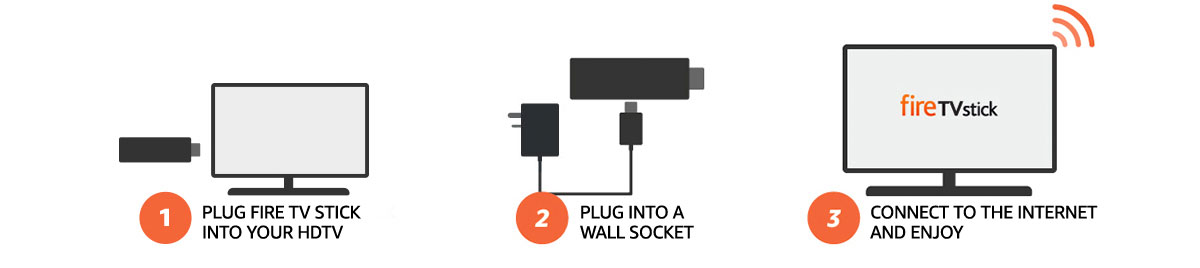
Just plug your Fire TV Stick into an HDTV and start streaming in minutes. Use the included Alexa Voice Remote to search across apps and find the best way to watch. The Fire TV Stick has the fastest Wi-Fi and most accurate voice search of any streaming media stick. Shows start faster and stream more smoothly than ever before.
.jpg)
With access to Amazon Video, Netflix, Curzon Home Cinema, All 4 and more, there are tens of thousands of TV episodes and movies ready to stream. Watch live TV (including sports and news) as it happens. Directly access millions of websites such as YouTube, Facebook, and Reddit with browsers like Silk and Firefox. Subscription fees may apply.
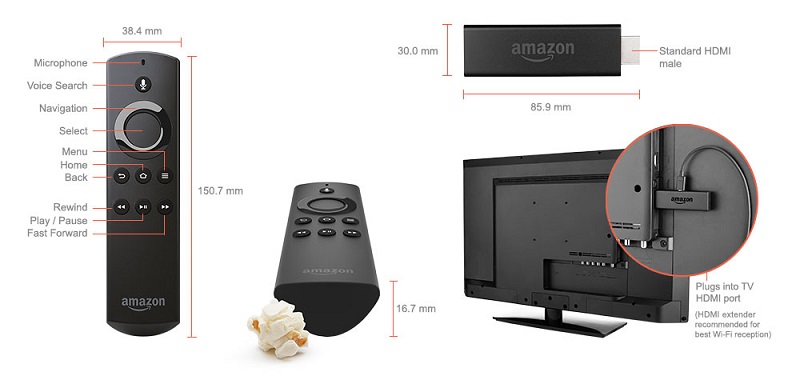
Use the Alexa Voice Remote to quickly find what you want to watch. Just say “Find romantic comedies” and Alexa will show you results from apps such as Netflix, Amazon Video and more. Want to skip the opening credits? Say “Fast forward a minute” within Amazon Video and Amazon Channels.
Stream Seamlessly with Said IPTV
Looking for a zero-buffering IPTV subscription for your device? Said IPTV delivers over 25,000+ live 4K/FHD channels, full beIN Sports, Botola Pro Inwi, Sky Sports, and a 120,000+ VOD library with instant WhatsApp activation.
Stream 25,000+ Channels with Zero Buffering
Get full access to beIN Sports, Botola Pro Inwi, 4K Cinema, and Netflix series in 5–15 minutes with local Moroccan payments (CIH, Attijariwafa, Cash Plus).
Related Tutorials & Guides
Wired Ethernet vs. 5 GHz Wi-Fi for IPTV: Which Is Best?
When setting up an IPTV service on a Smart TV, Firestick, or Android TV box, achieving a stable connection is critical for smooth, buffer-free streaming. While both Wired Ethernet and 5 GHz Wi-Fi offer more than enough raw speed for 4K and Full HD st
How to Fix IPTV Channels Buffering Only During Peak Hours?
Experiencing smooth, high-quality streams during the day, only for your channels to start buffering, looping, or freezing between 7:00 PM and 11:00 PM, is one of the most common issues with IPTV services. Because this buffering occurs strictly during
How to Test IPTV M3U url in a Web Browser?
Testing an M3U Playlist Link in a Browser If your provider only gave you a single, long M3U Playlist URL, you can test it directly in your browser. Analyzing the Result Developed by iptvhelpcenter.com