GooBang Doo XB-III
Said IPTV Engineering
Said IPTV Technical Architecture Desk

What is GooBang Doo XB-III?
With so many Android TV boxes out on the market today it can be difficult trying to pinpoint which one you should get. We think we can make a pretty convincing case that the GooBang Doo XB-III Android 7.1 TV Box is one of the best ones you can find. Plus you won’t have to go digging too deep in your pockets to get it as it is priced quite reasonably.
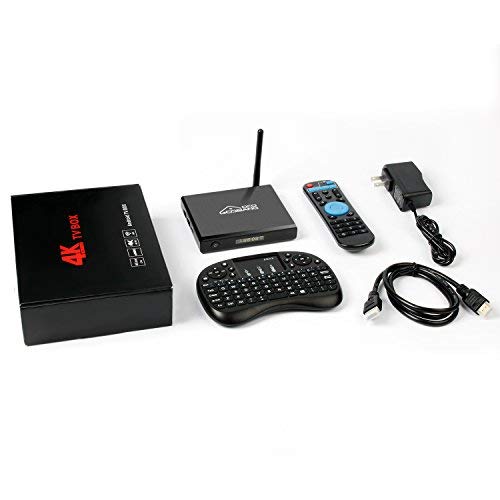
- Original from GooBang Doo, XB-III Android 7.1 TV box has added newest feature 3DB antenna that supports IEEE 802.11 B/G/N which is more than 4 times faster than others, no freezing and buffering anymore.
- It provides plentiful room 2GB RAM 16GB ROM to quickly start your apps and games. You can also add an extra TF card to expand storage up to 32GB, which improves the reliability of your XB-III TV box and prevents crashes due to lack of memory.
- Equipped with a newest mini keyboard which is an advanced option for you to control your XB-III tv box more smoothly and easily within 20 meters. What is more, you can also use your mobile phone to control XB-III tv box with no problem.
- Amlogic Quad Core ARM Cortex-A53 CPU up to 2GHz(DVFS) which is way ahead in image processing and computing. Its high machine configuration gives you ultra-fast running speed and professional image processing ability. With the built-in HD 2.0b transmitter, it supports HDR10 and HLG HDR processing and allows you to enjoy 4k*2k movies.
- Added On/Off button and Nixie tube fire-new function on the appearance. Portable, fashionable and durable which make sure it will never be outdated for your home theater system.
Installation
This device is using the Android OS which means you can use all apps that have been released for the Android OS.
These apps are available here with installation guide at:
-> How to install IPTV on Android

CAST YOUR EYES WIDER
Mirror screen of a smartphone or tablet PC to another big screen device with built-in
Airplay/DLNA/Miracast functions.
Enjoy playing games and watching films on the big screen (such as HDTV, Monitor & Projector, etc) instead of on your smartphone (Android above 4.4 and up to IOS 11) or tablet PC.
Official Pictures
Stream Seamlessly with Said IPTV
Looking for a zero-buffering IPTV subscription for your device? Said IPTV delivers over 25,000+ live 4K/FHD channels, full beIN Sports, Botola Pro Inwi, Sky Sports, and a 120,000+ VOD library with instant WhatsApp activation.
Stream 25,000+ Channels with Zero Buffering
Get full access to beIN Sports, Botola Pro Inwi, 4K Cinema, and Netflix series in 5–15 minutes with local Moroccan payments (CIH, Attijariwafa, Cash Plus).
Related Tutorials & Guides
Wired Ethernet vs. 5 GHz Wi-Fi for IPTV: Which Is Best?
When setting up an IPTV service on a Smart TV, Firestick, or Android TV box, achieving a stable connection is critical for smooth, buffer-free streaming. While both Wired Ethernet and 5 GHz Wi-Fi offer more than enough raw speed for 4K and Full HD st
How to Fix IPTV Channels Buffering Only During Peak Hours?
Experiencing smooth, high-quality streams during the day, only for your channels to start buffering, looping, or freezing between 7:00 PM and 11:00 PM, is one of the most common issues with IPTV services. Because this buffering occurs strictly during
How to Test IPTV M3U url in a Web Browser?
Testing an M3U Playlist Link in a Browser If your provider only gave you a single, long M3U Playlist URL, you can test it directly in your browser. Analyzing the Result Developed by iptvhelpcenter.com