How to optimize my VLC for watching IPTV?
Said IPTV Engineering
Said IPTV Technical Architecture Desk

There are some ways by which you can modify the setting of the VLC media player which finally can help you to watch IPTV with less buffering by increasing the cache size. In the following, some of these tips are mentioned. How to watch IPTV on VLC?

How to optimize VLC
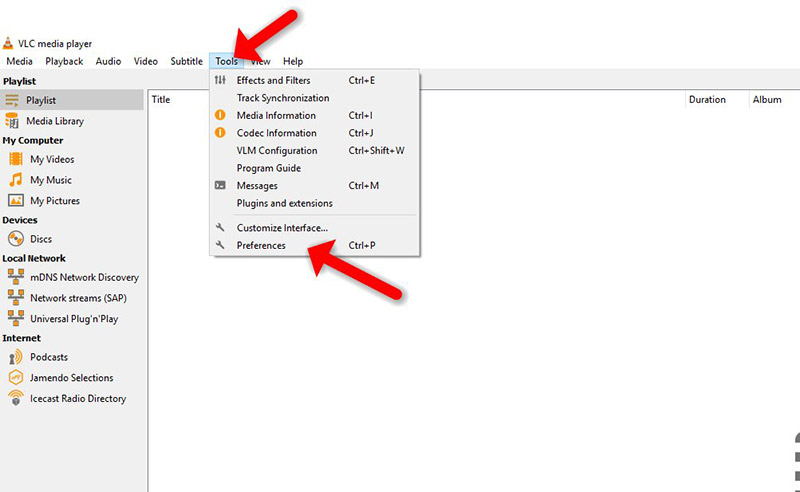
Step 1: Open VLC media player, select “Tools“, and click on “Preference“.
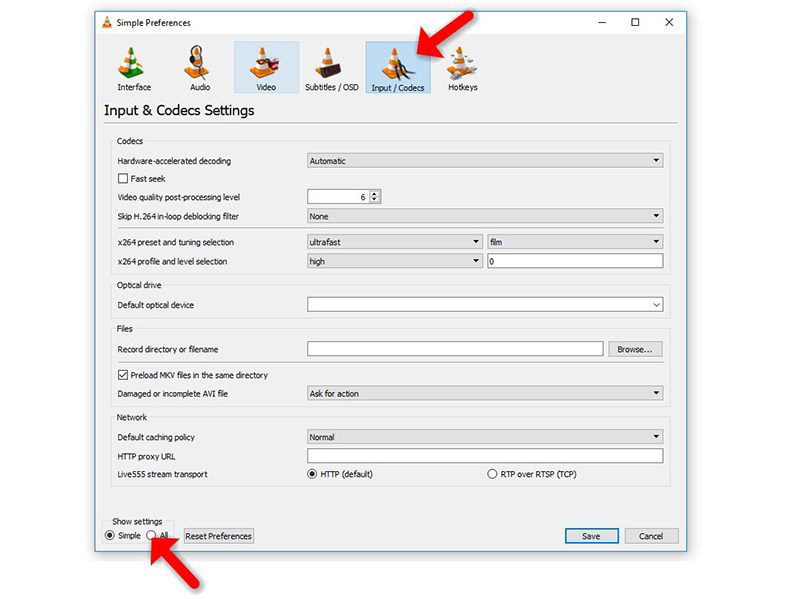
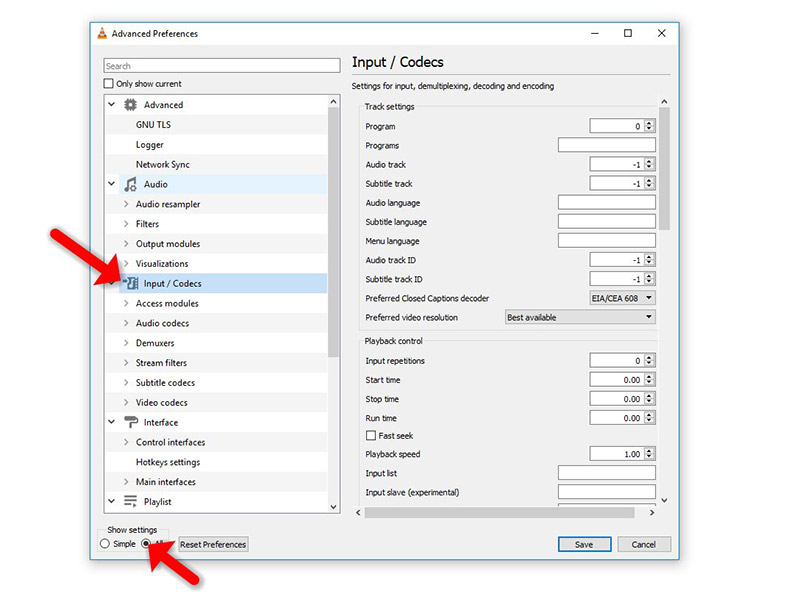
Step 2: Next, click “Input / Codecs” show setting “All” option at the bottom of the window. Click “Input / Codecs” in the left sidebar.
Step 3: If the file that is buffering is playing from a local hard drive (Static M3U file), look for the “File Caching (ms)” option under “Advanced” on the right side. The caching value here is estimated in milliseconds, so setting the value to 1000 will buffer for 1 second. The issue with setting this option too large is that if you want to manually skip to a new point, there will be a larger lag while the content is buffered again.
If the file you are trying to play is located on a network share (Dynamic M3U url), you can change the caching value for “Network Caching (ms)”.
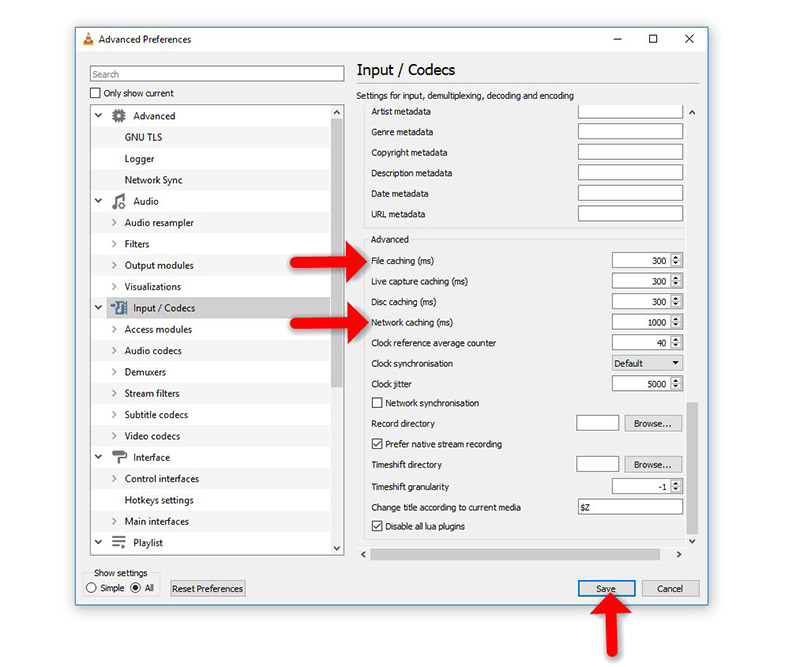
Cache size in VLC
Another temporary solution when you are running a network URL format or streaming files like TS and M3U file formats is explained below:
- Open VLC media player, click on “Media” and select “Open Network Stream“.
- Type the URL you want to play, then click on “Show More Options” checkbox.
- Now, based on your Internet speed you can increase the cache size.
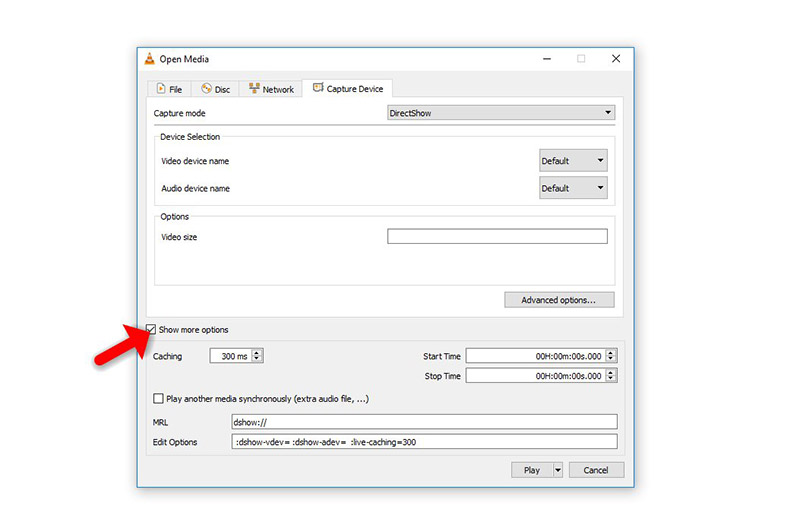
If you think need further help, feel free to discuss it with us in the comments section down below.
Developed by saidiptv.com
Stream Seamlessly with Said IPTV
Looking for a zero-buffering IPTV subscription for your device? Said IPTV delivers over 25,000+ live 4K/FHD channels, full beIN Sports, Botola Pro Inwi, Sky Sports, and a 120,000+ VOD library with instant WhatsApp activation.
Stream 25,000+ Channels with Zero Buffering
Get full access to beIN Sports, Botola Pro Inwi, 4K Cinema, and Netflix series in 5–15 minutes with local Moroccan payments (CIH, Attijariwafa, Cash Plus).
Related Tutorials & Guides
Wired Ethernet vs. 5 GHz Wi-Fi for IPTV: Which Is Best?
When setting up an IPTV service on a Smart TV, Firestick, or Android TV box, achieving a stable connection is critical for smooth, buffer-free streaming. While both Wired Ethernet and 5 GHz Wi-Fi offer more than enough raw speed for 4K and Full HD st
How to Fix IPTV Channels Buffering Only During Peak Hours?
Experiencing smooth, high-quality streams during the day, only for your channels to start buffering, looping, or freezing between 7:00 PM and 11:00 PM, is one of the most common issues with IPTV services. Because this buffering occurs strictly during
How to Test IPTV M3U url in a Web Browser?
Testing an M3U Playlist Link in a Browser If your provider only gave you a single, long M3U Playlist URL, you can test it directly in your browser. Analyzing the Result Developed by iptvhelpcenter.com