How to setup IPTV on BuzzTV Box?
Said IPTV Engineering
Said IPTV Technical Architecture Desk

The BuzzTV is packed in a plain-looking black box but it comes off as clean and moderately detailed. At the top of the box, you will see BuzzTV written in the middle of the space. All the sides of the box are left black and beneath this, you’ll see all of the features that the product sports, as well as the package contents. BuzzTV comes with an embedded Android operating system and it can also be utilized as an STB emulator. How to setup IPTV on Android devices using STB Emulator?

BuzzTV setup box can be also utilized with an M3U playlist. You can download an application from the Google Play store such as GSE or Perfect Player app and insert your M3U playlist. What is M3U list?
How to setup IPTV on BuzzTV
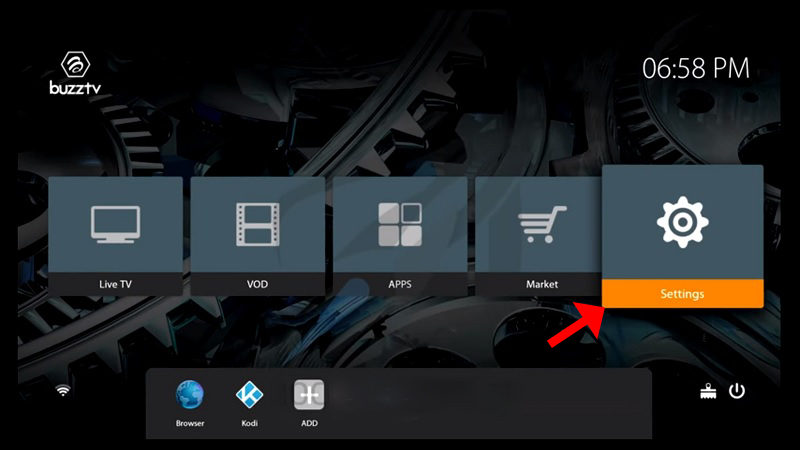
Step 1: On the main menu, click on “Settings” as depicted in the below picture.
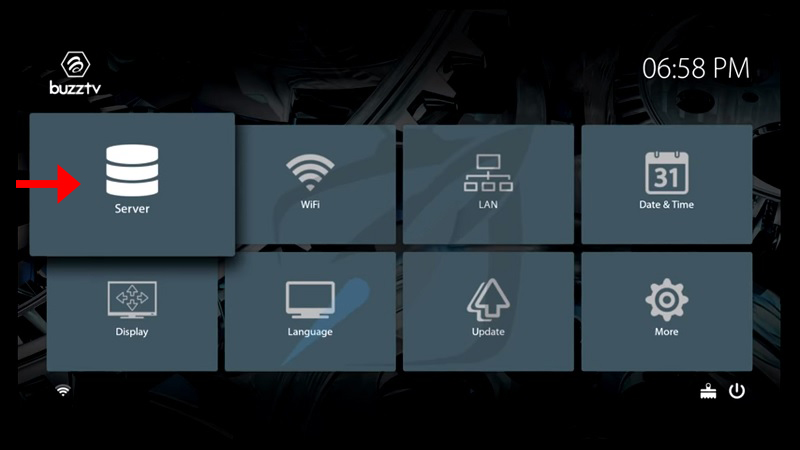
Step 2: Now click on “Servers” and proceed to the next step.
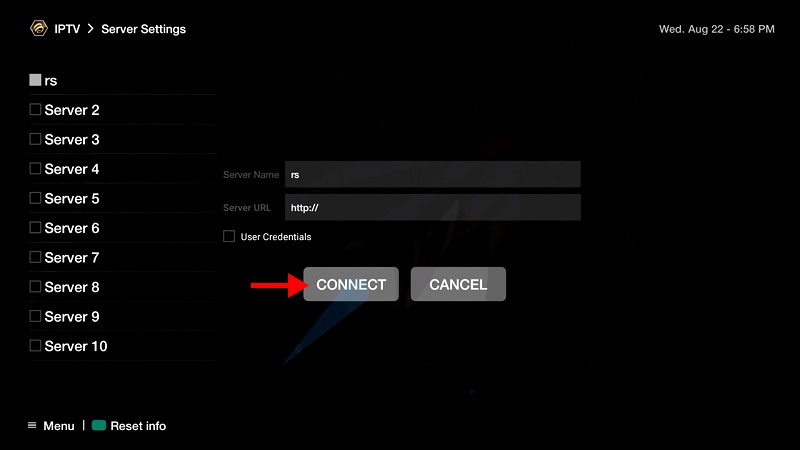
Step 3: Now you must insert your “Server URL” as well as adding a name (It can be any name you want) and click on “Connect“. You can also use username and password from your M3U with options line and connect to your IPTV servers by clicking on the “Use Credentials” box, however, connecting to the servers through the MAG portal is way simpler.
Please note, the server URL is provided by your IPTV distributor and the mac address of your device must be registered inside the IPTV providers server.
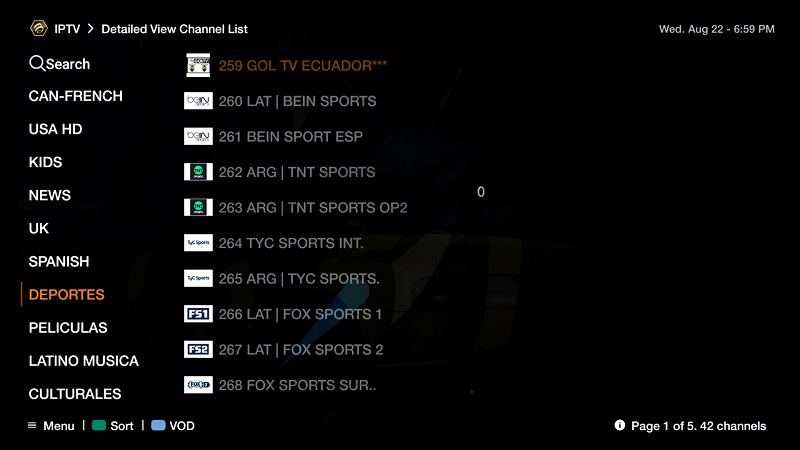
Step 4: After clicking on “Connect“, the channels will immediately pop up and you can click on any channel and start the stream.
Let us know in the comments section below about your opinion and feedback concerning this article. Thank you in advance.
The features of BuzzTV
- BuzzTV is powered by the Android OS so you can assume to have more benefits over the classic Linux set-top boxes. You can take advantage and experience a million more applications on the Google App Store and these include some of the favorite media player apps like IPTV Smarters,KODI, Plex, and more.
- BuzzTV also presents high-quality specifications compared to other IPTV boxes that are available in the market so you can be sure that their device will not fail. BuzzTV is also recognized as the high-speed channel changing device, as well as the best device that offers 4K ultra-high-definition picture quality which is a standard that comes with this device.
- BuzzTV offers you the best TV experience via its Easy Interface & Ultra-Fast Channel Zapping. They also support popular features such as Catch Up TV and a lot more.
Developed by saidiptv.com
Stream Seamlessly with Said IPTV
Looking for a zero-buffering IPTV subscription for your device? Said IPTV delivers over 25,000+ live 4K/FHD channels, full beIN Sports, Botola Pro Inwi, Sky Sports, and a 120,000+ VOD library with instant WhatsApp activation.
Stream 25,000+ Channels with Zero Buffering
Get full access to beIN Sports, Botola Pro Inwi, 4K Cinema, and Netflix series in 5–15 minutes with local Moroccan payments (CIH, Attijariwafa, Cash Plus).
Related Tutorials & Guides
Wired Ethernet vs. 5 GHz Wi-Fi for IPTV: Which Is Best?
When setting up an IPTV service on a Smart TV, Firestick, or Android TV box, achieving a stable connection is critical for smooth, buffer-free streaming. While both Wired Ethernet and 5 GHz Wi-Fi offer more than enough raw speed for 4K and Full HD st
How to Fix IPTV Channels Buffering Only During Peak Hours?
Experiencing smooth, high-quality streams during the day, only for your channels to start buffering, looping, or freezing between 7:00 PM and 11:00 PM, is one of the most common issues with IPTV services. Because this buffering occurs strictly during
How to Test IPTV M3U url in a Web Browser?
Testing an M3U Playlist Link in a Browser If your provider only gave you a single, long M3U Playlist URL, you can test it directly in your browser. Analyzing the Result Developed by iptvhelpcenter.com