MAG 322 W1
Said IPTV Engineering
Said IPTV Technical Architecture Desk

What is MAG 322 W1?
MAG322 is a powerful set-top box containing a high-performance processor on the BCM75839 chipset, and 512MB RAM. It’s the optimal solution for quick launch of your IPTV/OTT project.
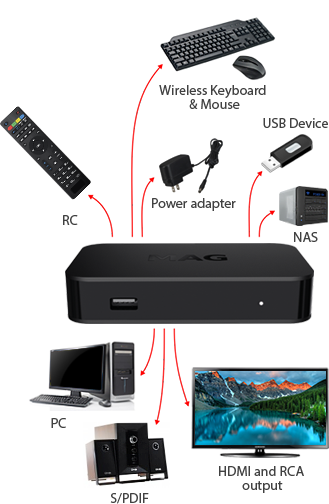
The set-top box is designed to fulfill current market needs. Your customers can enjoy the highest video and sound quality with HDMI 1.4b and S/PDIF (optional) outputs. HEVC support will dramatically reduce your network load.

Useful Features
The set-top box plays the HEVC-compressed files. This means the network load will be lower, even when delivering high-quality content.
The set-top box plays advanced 2D and 3D graphics with OpenGL ES 2.0 support.
The modern high-performance processor on the chipset BCM75839 and 512MB RAM is good enough to playback the high-quality video.
The audio output S/PDIF (optional) allows connecting the multichannel High-End system to the set-top box. HDMI 1.4b provides the highest quality of sound and image.
Official Pictures
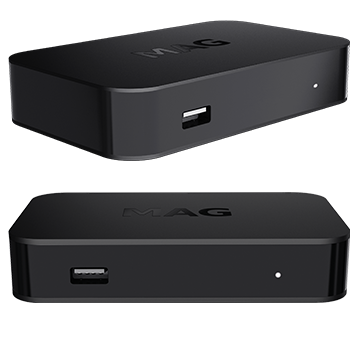
Stream Seamlessly with Said IPTV
Looking for a zero-buffering IPTV subscription for your device? Said IPTV delivers over 25,000+ live 4K/FHD channels, full beIN Sports, Botola Pro Inwi, Sky Sports, and a 120,000+ VOD library with instant WhatsApp activation.
Stream 25,000+ Channels with Zero Buffering
Get full access to beIN Sports, Botola Pro Inwi, 4K Cinema, and Netflix series in 5–15 minutes with local Moroccan payments (CIH, Attijariwafa, Cash Plus).
Related Tutorials & Guides
Wired Ethernet vs. 5 GHz Wi-Fi for IPTV: Which Is Best?
When setting up an IPTV service on a Smart TV, Firestick, or Android TV box, achieving a stable connection is critical for smooth, buffer-free streaming. While both Wired Ethernet and 5 GHz Wi-Fi offer more than enough raw speed for 4K and Full HD st
How to Fix IPTV Channels Buffering Only During Peak Hours?
Experiencing smooth, high-quality streams during the day, only for your channels to start buffering, looping, or freezing between 7:00 PM and 11:00 PM, is one of the most common issues with IPTV services. Because this buffering occurs strictly during
How to Test IPTV M3U url in a Web Browser?
Testing an M3U Playlist Link in a Browser If your provider only gave you a single, long M3U Playlist URL, you can test it directly in your browser. Analyzing the Result Developed by iptvhelpcenter.com