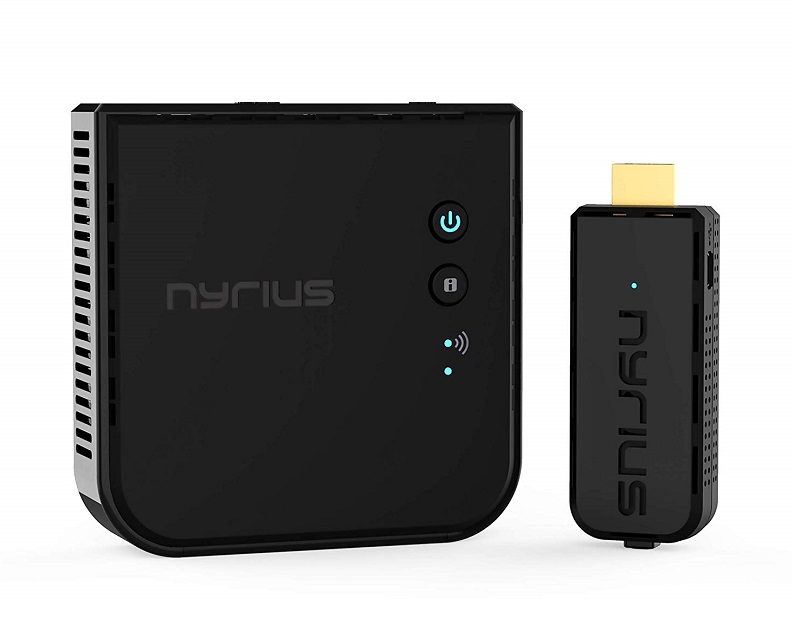
Nyrius ARIES Prime Wireless Video HDMI Transmitter & Receiver
Said IPTV Engineering
Said IPTV Technical Architecture Desk

What is Nyrius ARIES Prime?
The Nyrius ARIES Prime Wireless HDMI Transmitter enables you to watch what you want by streaming from your laptop or any HDMI device to your TV in razor-sharp, uncompressed 1080p high definition video with absolutely no loss in picture quality – it’s like an invisible HDMI cable.
- Wirelessly stream true 1080p high definition 3D video & digital audio to your TV or projector. Watch movies & TV shows from your laptop, PC, Mac, A/V receiver, gaming console, cable/satellite
- The transmitted signal is crystal clear, able to stream uncompressed HD video & audio with ease. Signal experiences zero latency (real time) even when streaming 3D video to a 1080p device
- Easy to install plug in play set up eliminates the need to install expensive, inconvenient cables. No software or WiFi connection required. Transmitter: 1 x HDMI input, Receiver: 1 x HDMI output
- High-performance digital signal transmits through walls, ceilings, & floors (streaming line of sight results in maximum 30ft range)
- Compact low profile design makes it perfect for laptops and works with any HDMI video device
.jpg)
High-Performance Digital Signal
Transmits your favorite TV shows, films, music, sport, & games, through walls, ceilings, & floors (streaming line of sight results in maximum 30ft range).
Cut the Cord for Good
Wires are a disadvantage of modern electronic devices. They disrupt the style of your room, they are a potential tripping hazard, & they limit where your devices can be located. The NPCS549 removes wires from the equation, allowing you to place HDMI devices where you want them.
Unlimited Entertainment on Your Terms
Now you can watch movies stored on your computer & content from services like YouTube, Netflix, or other video streaming websites, on your big screen HDTV. Revel in the independence of no longer being limited by wires, software applications, TV schedules or your cable bill.
Full Compatibility with any HDMI Source & Display
While optimized for use with laptops, the ARIES Prime media streaming stick wirelessly connects any HDMI device to your HDTV or projector. Unlike other streaming sticks, the Prime is true HDMI mirroring – what you see on your HDMI source is exactly what you see on your TV in real time. The powerful, high-speed digital signal won’t interfere with Bluetooth, WiFi, or any other wireless network.
Simple Plug & Play
The ARIES Prime’s convenient plug & play setup gets you watching wireless video fast. There’s no software required – all you have to do is plug the transmitter & receiver directly into your device’s HDMI connections & you’re immediately connected.
Applications
Watch 1080p movies wirelessly on your projector or HDTV, with 3D compatibility.
Enhance presentations by sharing your screen in HD while using your laptop to follow your notes; perfect portability for work & play.
Conveniently browse the internet, shop online, stream media & play games from your laptop on your HDTV.
What is Included
Wireless HDMI Transmitter, Wireless HDMI Receiver, 100-240v AC Power Adapter for Receiver, Mini-USB Power Cable for Transmitter, 5 ft. HDMI Cable, Right Angle Adapter, Quick Start Guide, Instruction Manual, Lifetime Customer Support.
Official Pictures
.jpg)
Stream Seamlessly with Said IPTV
Looking for a zero-buffering IPTV subscription for your device? Said IPTV delivers over 25,000+ live 4K/FHD channels, full beIN Sports, Botola Pro Inwi, Sky Sports, and a 120,000+ VOD library with instant WhatsApp activation.
Stream 25,000+ Channels with Zero Buffering
Get full access to beIN Sports, Botola Pro Inwi, 4K Cinema, and Netflix series in 5–15 minutes with local Moroccan payments (CIH, Attijariwafa, Cash Plus).
Related Tutorials & Guides
Wired Ethernet vs. 5 GHz Wi-Fi for IPTV: Which Is Best?
When setting up an IPTV service on a Smart TV, Firestick, or Android TV box, achieving a stable connection is critical for smooth, buffer-free streaming. While both Wired Ethernet and 5 GHz Wi-Fi offer more than enough raw speed for 4K and Full HD st
How to Fix IPTV Channels Buffering Only During Peak Hours?
Experiencing smooth, high-quality streams during the day, only for your channels to start buffering, looping, or freezing between 7:00 PM and 11:00 PM, is one of the most common issues with IPTV services. Because this buffering occurs strictly during
How to Test IPTV M3U url in a Web Browser?
Testing an M3U Playlist Link in a Browser If your provider only gave you a single, long M3U Playlist URL, you can test it directly in your browser. Analyzing the Result Developed by iptvhelpcenter.com