Pendoo X8 Mini
Said IPTV Engineering
Said IPTV Technical Architecture Desk

What is Pendoo X8 Mini?
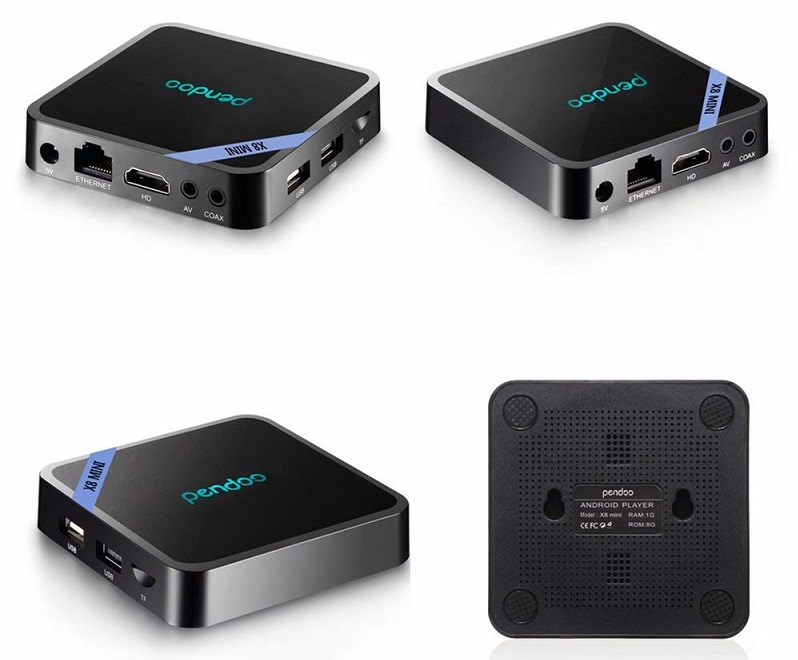
Pendoo X8 Mini Android TV Box designed to turn your regular TV into a smart TV, put your favorite shows, movies, games, and sports in 4K resolution, you just need to power up the device, connect the internet, sit down and enjoy, which makes your home entertainment become much easier and fabulous.
- 【Newest Android 7.1 OS】Our X8 Mini Android Box comes with the fast and powerful Android 7.1.2 OS which is rapid and stable, more than 4 times performance improvements and compatibility with the latest android apps, games and applications, better user interface and user experience.
- 【High Reaction Speed】The android 7.1 box provides plentiful room 2GB RAM 16GB ROM and 64 bit CPU to quickly start your apps and games. You can also expand the memory via micro SD/TF card slot (up to 32GB). Without buffering or breaking down and never worry about running out of space.
- 【Ethernet & Stable WiFi】The android tv box built-in 2.4GHz Wi-Fi and standard RJ-45, supports 10M/100M network speed levels, offer convenient connection and more stable WIFI signal to enjoy higher quality video experience. You will never have to worry about the slow speed for downloading.
- 【Strong Decoding Ultra HD】The smart tv box supports H.265 Hardware decoding which can save 50% of bandwidth resources to run faster. 4k 2k HD output which provides you high definition viewing and fluent video playing, making it as the highest resolution signal available for home movies.
- 【Best Service & Guarantee】Pendoo X8 Mini android box 7.1 provides better and happier entertainment experience for you to stay with your family and friends. 1-year warranty and the best customer service. Welcome to contact us if you have any question or concern, we will fix your issue within 24 hours.
Installation
This device is using the Android OS which means you can use all apps that have been released for the Android OS.
These apps are available here with installation guide at:
-> How to install IPTV on Android
Newest Android 7.1.2 Nougat OS
Our Pendoo X8 Mini Android Box come with updated android 7.1.2 Nougat Operating System which is faster and more efficient.
Make sure the box running stable and smooth to load movies, pictures and games without buffering, no need to wait for the wonderful moment. More efficient, safe and fast rather than being radically different from the Android 6.0 version.
Strong Decoding Ability
4k2k HD decoding and H.265 hardware can save 50% bandwidths resources and proceed 4K Ultra HD strikingly realistic pictures. Excellent video processing capabilities offer you the extreme visual feasts. It can be used to play almost all popular audio and video formats.
Install your favorite apps and enjoy advanced technology in a large 4K screen smoothly. It lets you fully enjoy all happy with the help of such a wonderful Android box.
Stream Seamlessly with Said IPTV
Looking for a zero-buffering IPTV subscription for your device? Said IPTV delivers over 25,000+ live 4K/FHD channels, full beIN Sports, Botola Pro Inwi, Sky Sports, and a 120,000+ VOD library with instant WhatsApp activation.
Stream 25,000+ Channels with Zero Buffering
Get full access to beIN Sports, Botola Pro Inwi, 4K Cinema, and Netflix series in 5–15 minutes with local Moroccan payments (CIH, Attijariwafa, Cash Plus).
Related Tutorials & Guides
Wired Ethernet vs. 5 GHz Wi-Fi for IPTV: Which Is Best?
When setting up an IPTV service on a Smart TV, Firestick, or Android TV box, achieving a stable connection is critical for smooth, buffer-free streaming. While both Wired Ethernet and 5 GHz Wi-Fi offer more than enough raw speed for 4K and Full HD st
How to Fix IPTV Channels Buffering Only During Peak Hours?
Experiencing smooth, high-quality streams during the day, only for your channels to start buffering, looping, or freezing between 7:00 PM and 11:00 PM, is one of the most common issues with IPTV services. Because this buffering occurs strictly during
How to Test IPTV M3U url in a Web Browser?
Testing an M3U Playlist Link in a Browser If your provider only gave you a single, long M3U Playlist URL, you can test it directly in your browser. Analyzing the Result Developed by iptvhelpcenter.com